Branding your organization
Your brand kit lives in your organization settings and gives everything you publish a consistent look — without designing each page from scratch.
Logo & favicon
Upload your logo and favicon in Settings → Public Information. Your logo appears across your public pages and emails; the favicon is the small icon in the browser tab. Both are uploaded through the media picker and served from our fast CDN.
Style Manager
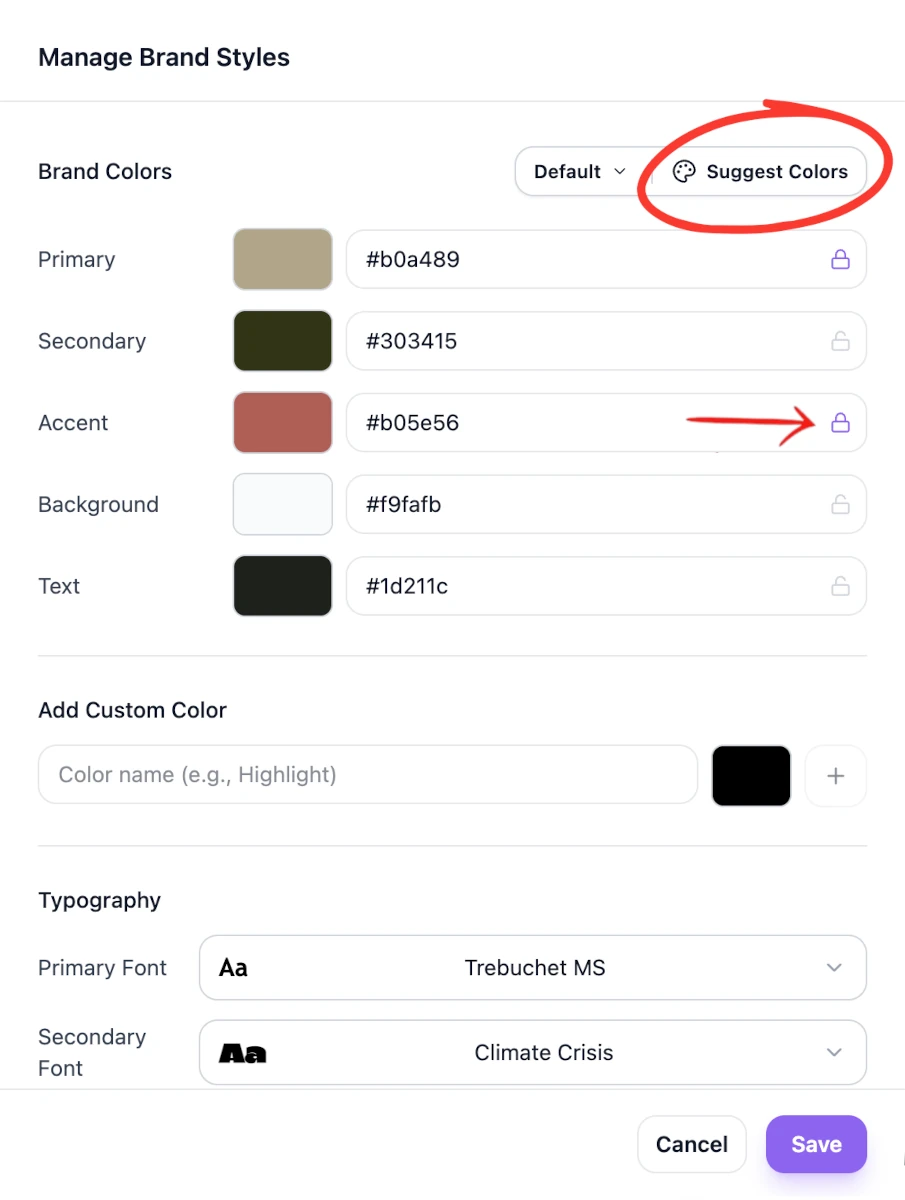
In Settings → Language & appearance, select Manage Styles to open the style manager and set your palette. You don't have to pick every color by hand: choose a primary color and FireVue generates a harmonious palette around it — secondary, accent, background, and text — using proven color-harmony rules. Like a color? Lock it and regenerate the rest until the combination feels right.
These colors flow through to your public pages, so your event looks on-brand from the first visit.
You can also pick fonts and set a look for buttons and user input fields.
💡 Tip: Each event also has its own style, so you can keep a consistent organization look while letting a single event stand out when you want it to.
Languages
Under Language & appearance, select Manage Languages to choose which languages your organization offers and which one is the default — handy when you publish to an international audience. See SEO & multi-language pages.
Where to manage it
Everything here is under Settings in your organization — see the Organization settings reference for the full page.
Was this helpful?